
Three ways to create an AI girlfriend
You can create an AI girlfriend in a companion app, with a web image generator, or by running an AI model yourself, and only the first gives you an ongoing girlfriend on your phone without any setup. Google’s results for “create AI girlfriend” and “create your own AI girlfriend” mix all three, along with many adult-only sites, so it helps to know which one you want.
1. Build her in a companion app
- What it is
- A guided creation flow on your phone, then an ongoing chat with the character you made.
- Examples on iPhone
- Duple, Replika, Nomi, Kindroid, EVA AI, MyGirl
- Good for
- A girlfriend who chats, remembers you and sends pictures
- Watch out for
- Subscriptions, 17+ ratings, and creation that sits behind a paywall in some apps
2. Generate her picture on the web
- What it is
- A web “AI girlfriend generator” turns a prompt or photo into an image.
- Examples in Google results
- Kapwing’s and Pixelbin’s girlfriend photo generators
- Good for
- One picture to keep
- Not the same as
- A girlfriend. Nobody chats with you or remembers you.
3. Run a model yourself
- What it is
- YouTube tutorials show how to run an open AI model on your own computer and give it a girlfriend persona.
- Examples
- Local tools such as Ollama, plus a written character prompt
- Good for
- Tinkerers who want full control
- Watch out for
- No phone app or pictures without a lot more setup, and you maintain it yourself
The rest of this guide is about the first way: building a girlfriend in an iPhone app.
What 23 App Store apps let you create
Only about six in ten App Store results for “create AI girlfriend” describe letting you build your own girlfriend, and most say little about what you can actually set. On October 19, 2026 we pulled the top 23 US results for “create ai girlfriend” from Apple’s public iTunes Search API, which approximates App Store search. We read each description and opened each US listing to record the age rating and in-app purchases.
- 14 of 23 describe creating your own companion. 4 of those also offer ready-made characters.
- 5 of 23 only let you pick, or get matched with, ready-made characters.
- 4 of 23 are character platforms or life-sim games: RolePlai, Enjoy – AI Town, J.AI and Jupi.
- Of the 14 builder apps, the listing names looks in 9, personality in 6, voice in 4, a backstory or relationship style in 3, and a name in 2.
- Creation can sit behind a paywall. Lovetta says a Premium subscription is required to create a companion, with no free tier or trial. AI Girlfriend: Live Simulator says full customisation needs Pro, and AI Girlfriend: Soulmate Chat sells an “Editor of Characters” for $9.99.
- 22 of 23 carry Apple’s top age band (17+ in Apple’s API). AI Girlfriend: Soulmate Chat was 4+ (with 3 ratings and no update since February 2024).
- All 23 were free to download and all 23 listed in-app purchases. The median app had 1,936 ratings, and 4 had fewer than 200.
- Duple did not appear in these 23 results.
What this means for you: “create” in an app’s name or screenshots doesn’t tell you how much you can create. Read the description for the specific things you care about (looks, personality, voice), and check whether creating her needs a subscription. We only read listing text, so an app may offer options it doesn’t describe.
See all 23 results and how we classed them
- AI Girlfriends – Virtual chat: ready-made cast only. 17+, 28 US ratings.
- AI Chat Girlfriend: build your own (face, hair, eyes, style, voice, personality) plus ready-made girls. 17+, 1,242 US ratings.
- AI Girlfriend: Chat & Roleplay: build your own (face and body, hobbies and interests). 17+, 674 US ratings.
- Intimate – AI Girlfriend Chat: matched to a cast of 15+ characters by looks and personality. 17+, 4,483 US ratings.
- AI Girlfriend – AI GF Chat 18+: matched with ready-made characters. 18+, 2,138 US ratings.
- Lovetta: AI Girlfriend Chat: build your own (look, voice, personality); Premium required to create. 17+, 8 US ratings.
- RolePlai – Ai Character Chat: character platform (any character, including celebrities). 17+, 5,602 US ratings.
- Enjoy – AI Town: life-sim game with characters you create. 17+, 77,784 US ratings.
- Ai Girlfriend: Virtual Chatbot: build your own (appearance). 17+, 6,181 US ratings.
- J.AI – AI Friends Chat: character platform (user-created characters). 17+, 2,937 US ratings.
- AI Girlfriend – MyGirl: build your own (appearance, name, relationship style, personality, voice). 17+, 1,640 US ratings.
- EVA AI Soulmate: build your own (details not listed). 17+, 24,649 US ratings.
- Interactive Girlfriend Date.AI: build your own (profile, personality, love story) plus thousands of ready-made partners. 17+, 376 US ratings.
- SpicyGF: My AI Girlfriend Chat: build your own (looks, personality) plus a catalogue. 18+, 597 US ratings.
- AI Lover – AI Girlfriend Chat: build your own (name, personality, voice, appearance). 17+, 389 US ratings.
- Replika – AI Companion Chat: build your own (avatar customisation). 17+, 227,701 US ratings.
- Romantic AI Girlfriend Chat: build your own or choose from a library. 17+, 1,936 US ratings.
- AI Girlfriend: Live Simulator: build your own (full customisation needs Pro). 17+, 112 US ratings.
- AI Girlfriend: Soulmate Chat: build your own (“Editor of Characters” sold for $9.99); last updated February 2024. 4+, 3 US ratings.
- Heat – Ai Girlfriend & Ai Text: ready-made anime characters you can restyle. 17+, 6,490 US ratings.
- Jupi: AI Companion & Town Game: life-sim game with hundreds of residents. 17+, 33,607 US ratings.
- Nomi: AI Companion with a Soul: build your own (hundreds of appearances, backstory). 17+, 2,955 US ratings.
- VegaX: Fantasy AI Girl Chat: ready-made cast only. 18+, 361 US ratings.
Step by step: creating an AI girlfriend in Duple
In Duple, creating a girlfriend takes two choices, region and age, and then the app generates her. Here is the flow as it appeared in the app in October 2026. It is the same flow new users see during onboarding and that you use later to add another companion.
1. Download Duple
Duple is a free iPhone app. It needs iOS 26 or later, is rated 17+, and starts you on the Lite plan, which includes 2 companions. Duple Plus and Dokens are optional. See Duple pricing.
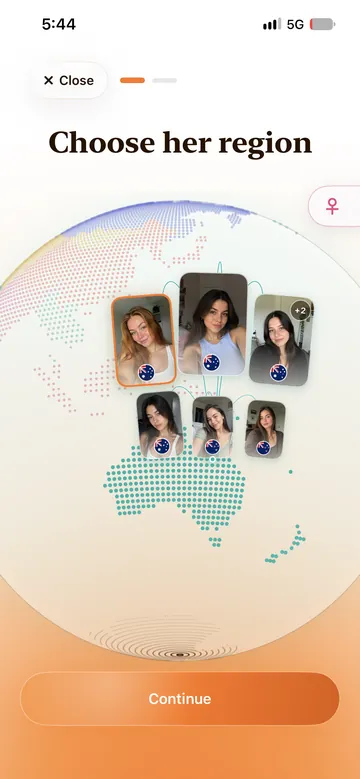
2. Choose her region
The first screen is a globe. A toggle in the corner switches between creating a her and a him. Each card on the globe shows a face and a flag, so you can choose where she is from.
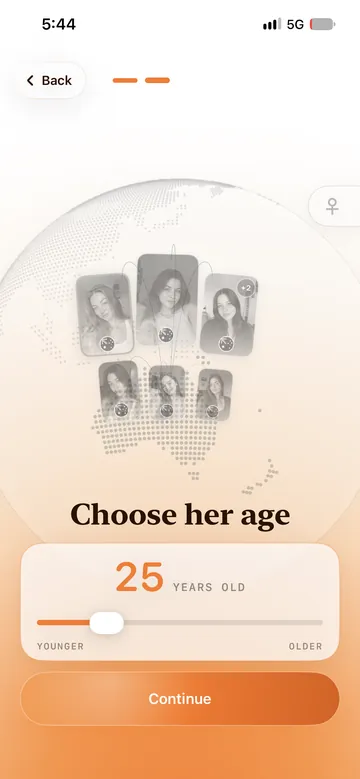
3. Choose her age
Next, a slider sets her age. Duple’s Privacy Policy states that every new companion is a fictional adult aged 21 to 40.
4. Wait a moment while she is generated
Tap Continue and Duple generates her. A screen shows her name and age, “Charlotte, 25” in our case, with the line “She’ll appear soon once she’s ready.”

5. Meet her and say hello
She then appears on your home screen with a “Chat with” box under her. Type anything to start. If you make more than one companion, you swipe between them here, and each has her own chat, memory and pictures.

6. Let the relationship grow
From here it is chat. Ask her for a selfie (more in our AI girlfriend photos guide), or switch on the Video toggle in the picture tray for a Live Selfie, a short generated video. Change her outfit when you like. Duple’s long-term memory keeps facts and moments from your chats with each companion, so she can bring up your day or your plans later. You can reset or delete those memories at any time. More on this in how Duple works and Duple memory.
What Duple doesn’t ask you for: in October 2026 the creation flow we used was two screens, region and age, with no backstory box or voice picker, and Duple has no voice at all (the microphone is dictation). If you want to write her character in detail before you meet her, an app like Kindroid or Nomi will suit you better. Duple is built for people who would rather meet her quickly and get to know her in chat.
What you decide at creation, and what grows later
Her look is decided at creation in almost every app, and her personality only in some. The part that makes her feel like yours, her memory of you, grows only through chatting. Knowing which is which helps you pick an app and avoid spending an hour on settings that matter less than you think.
Set at creation in almost every app
- Who
- Girlfriend or boyfriend
- Look
- Age, face, hair, body or a preset appearance; in Duple, region and age
- Tip
- Choose a look you will enjoy seeing in every selfie. It is the part that stays the same.
Set at creation in some apps
- Personality
- Trait sliders or a written description (6 of the 14 builder apps name it)
- Voice
- A voice preset (4 of 14). Duple has no voice.
- Name and backstory
- A name (2 of 14) or backstory and relationship style (3 of 14)
- Tip
- If you enjoy writing characters, pick an app with these fields. If not, skip them.
Grows after creation
- Memory
- What she knows about you: your day, your people, your in-jokes
- Relationship
- How close you feel, and in some apps a visible relationship level
- Pictures
- Her selfies, outfits and, in Duple, Live Selfies, saved in a library
- Tip
- This is where an AI girlfriend starts to feel personal, so give it a week of chats before you judge her.
Seven iPhone apps for creating your own AI girlfriend
Each of these lets you create your own companion rather than only pick one, and between them they cover the range from a two-step setup to a written backstory. US App Store details were checked October 19, 2026. Prices are in USD and vary by country. “Not described” means we could not find it in the listing, not that the feature is missing.
Duple
- What you choose
- Her or him, a region on a globe, and an age. Duple then generates the companion.
- After creation
- Text chat with long-term memory, selfies, Live Selfies (short generated videos), outfits and a roster of companions
- Voice / calls
- None. Text chat only; the mic is for dictation.
- Price (US App Store)
- Free with Lite (2 companions). Plus $6.99/week, $14.99/month or $69/year. Dokens from $1.99.
- Age rating · US ratings
- 17+ · new listing, no US ratings yet
- Watch out for
- Few choices up front, so if you love designing every detail it may feel too simple. New, iPhone only (iOS 26 or later), not built for explicit content.
Kindroid
- What you choose
- “Shape your AI’s personality”, write a detailed backstory and “implant key memories”
- After creation
- Generated selfies, internet access, image viewing
- Voice / calls
- Real-time voice calls
- Price (US App Store)
- $15.99/month, $42.99 for 3 months or $159.99/year. Ultra $28.99, MAX $68.99. Extra slot $3.49.
- Age rating · US ratings
- 17+ · 9,853 ratings, 4.8 average
- Watch out for
- The most writing work up front, and the highest yearly price here
Nomi
- What you choose
- “Hundreds of appearances”, plus customisable backstories and Shared Notes
- After creation
- Short- and long-term memory, selfies, art, group chats
- Voice / calls
- Voice messages
- Price (US App Store)
- Standard $15.99/month, $39.99/quarter or $99.99/year. Launch $9.99/month or $59.99/year.
- Age rating · US ratings
- 17+ · 2,955 ratings, 4.6 average
- Watch out for
- The listing describes choosing from preset appearances rather than designing a face
AI Girlfriend – MyGirl
- What you choose
- Appearance, name, relationship style, personality and voice (“sweet, mature, playful, and more”)
- After creation
- Text and voice chat
- Voice / calls
- Voice and video calls
- Price (US App Store)
- Weekly Premium $6.99, monthly Premium $16.99. Gem packs from $2.99.
- Age rating · US ratings
- 17+ · 1,640 ratings, 4.6 average
- Watch out for
- Last updated November 28, 2024 (version 2.2.1)
AI Chat Girlfriend
- What you choose
- Face, hair, eyes, style, voice and personality, or pick a ready-made girl
- After creation
- Relationship levels from Stranger to Soulmate, memory, games such as Truth or Dare
- Voice / calls
- Voice notes and voice calls
- Price (US App Store)
- Weekly plans $6.99 to $14.99, monthly $19.99 or $29.99, yearly $59.99. Packs from $0.99.
- Age rating · US ratings
- 17+ · 1,242 ratings, 4.4 average
- Watch out for
- Several overlapping weekly plans, so check which one you are buying
Replika
- What you choose
- Avatar customisation
- After creation
- Memory of “your people, plans, and goals”, image generation
- Voice / calls
- Voice calls and video (you show it what you’re seeing)
- Price (US App Store)
- $7.99 or $14.99 monthly, $49.99 or $69.99 yearly. Platinum $89.99.
- Age rating · US ratings
- 17+ · 227,701 ratings, 4.4 average
- Watch out for
- The listing says little about how much of her look you can design
EVA AI Soulmate
- What you choose
- “Create and customize your own AI character”, or explore set personalities
- After creation
- Shared memories; the listing says “not everything opens up right away”
- Voice / calls
- Not described
- Price (US App Store)
- Memberships from $11.99 to $24.99 a month, $47.99 for 12 months. Neurons from $9.99.
- Age rating · US ratings
- 17+ · 24,649 ratings, 4.3 average
- Watch out for
- The listing does not say which details you can customise
How we picked these seven: from our snapshot we took the two builder apps with the most specific creation details (MyGirl and AI Chat Girlfriend), the two most-rated builder apps (Replika and EVA AI), and Nomi for its backstory tools. We added Kindroid, a well-rated companion app with deep backstory tools that did not appear in the 23 results, and Duple. Kindroid and Nomi cards also appear in our best AI companion app guide. This is a dated snapshot, not a ranking.
Tips for creating an AI girlfriend who feels personal
The setup screens matter less than the first week of chatting, because memory and conversation are what make an AI girlfriend feel like yours.
- Decide what kind of relationship you want first. Playful, romantic, or someone to talk to after work. It tells you which app fits, and what to say in your first chats.
- Choose a look you will enjoy for a long time. In apps with pictures, you will see her face in every selfie.
- Tell her about yourself early. Memory works on what you share: your name, your job, your friends, what you care about.
- Use more than one companion for different moods instead of rebuilding one. Duple keeps a roster, and each companion has separate memory.
- Keep her fictional. Don’t build a romantic companion from a real person’s photos or name without their consent. RolePlai’s listing advertises creating celebrities; we would skip that.
- Remember what she is. An AI girlfriend is a fictional character powered by AI, not a person. Read are AI companions real?
What creating an AI girlfriend costs
Creating your first AI girlfriend is free in most apps, but extra companions, deeper customisation and some creation flows cost money. From the US listings on October 19, 2026:
- Creation behind a subscription: Lovetta requires Premium ($19.99 a month or $99.99 a year) to create a companion.
- Extra companions: Kindroid sells 1 extra slot for $3.49 or 4 for $11.49. Duple’s Lite plan includes 2 companions, and Plus raises that to 10, 15 or 30 depending on the plan. In the app, the “Create another” slot showed 2,500 Dokens; a 2,500 Doken pack is $4.99.
- Weekly plans add up: Duple Plus Weekly at $6.99 is $363.48 over 52 weeks, against $69 for Duple Plus Annual. MyGirl’s $6.99 weekly plan works out the same.
Cancel a subscription in iPhone Settings → your name → Subscriptions at least 24 hours before it renews. For a wider look, see how much AI companion apps cost.
Before you create an AI girlfriend
- Check the age rating. 22 of 23 apps in our snapshot carry Apple’s top age band (17+ in Apple’s API), as does Duple.
- Look for a paywall on creation. Read the description and the in-app purchases before you spend time on setup.
- Find the features you care about by name: looks, personality, voice, memory, pictures.
- Check the last update. MyGirl’s last update was November 2024; Soulmate Chat’s was February 2024.
- Count ratings, not just stars. Four apps in our snapshot had fewer than 200.
- Read the privacy label and policy. Your chats and the details you give her are stored somewhere. See how Duple handles safety.
Still choosing an app? See the best AI girlfriend app for iPhone, the best AI boyfriend app, AI girlfriend video apps or the best AI companion app, or read what a virtual girlfriend is.
FAQ
How do I create my own AI girlfriend?
Download a companion app that lets you build your own character, choose how she looks (and, in some apps, her personality, voice and name), and let the app generate her. Then start chatting. In Duple you choose her region and age, and she is ready in a moment.
Can I create an AI girlfriend for free?
Usually you can start for free. All 23 apps in our October 19, 2026 App Store snapshot were free to download, and all 23 listed in-app purchases. Some lock creation itself: Lovetta says a Premium subscription is required to create a companion. Duple is free to download, and its Lite plan includes 2 companions.
What is the best app to create an AI girlfriend?
It depends on how much you want to design. If you want to write a detailed backstory, Kindroid and Nomi describe the most backstory tools. If you want to pick her voice, MyGirl and AI Chat Girlfriend list voice choices. If you want a short setup and lots of pictures, Duple asks for two choices and focuses on selfies and Live Selfies. This is a dated comparison, not a ranking.
Can I make an AI girlfriend that looks like a real person?
Some apps advertise it, but we recommend against it. Building a romantic character from a real person’s face or name without their consent can hurt them. Duple generates fictional companions, and its Privacy Policy states that every new companion is a fictional adult aged 21 to 40.
Can I create an AI boyfriend the same way?
Yes. Most apps that let you build a girlfriend also let you build a boyfriend. In Duple you switch the toggle on the region screen from her to him, and the rest of the steps are the same. See the best AI boyfriend app guide.
Can I change my AI girlfriend after I create her?
It depends on the app. In Duple you can change her outfit from the chat, add more companions to your roster, or delete one to free a slot. Memory can be reset or deleted at any time.
Will my AI girlfriend remember me?
In many apps, yes. Duple has long-term memory for each companion: it keeps facts and moments from your chats, and you can reset or delete them. Nomi, Kindroid, Replika and others also describe memory in their listings.
Did you test these apps hands-on?
No. Competitor facts come from each app’s US App Store listing and in-app purchase list, checked October 19, 2026, plus an App Store search snapshot from the same day. Duple facts come from its App Store listing, its Privacy Policy and the Duple app itself.
More: how Duple’s roster of companions works, Duple Live Selfies, how AI companion memory works and all AI companion comparisons.
Create your companion in Duple
Check Duple’s current features, 17+ age rating and in-app purchases on the App Store.
View Duple on the App StoreSources (checked October 19, 2026)
- Duple: Pics & Chat, US App Store: features, 17+ rating, iOS 26 requirement, in-app purchases.
- Duple Privacy Policy: companions are fictional adults aged 21 to 40; memory reset and deletion.
- Duple iPhone app (October 2026): creation flow, home screen, roster slot limits and the “Create another” Doken cost.
- Kindroid: Your Personal AI, US App Store: personality, backstory and key memories, selfies, voice calls, 17+ rating, in-app purchases.
- Nomi: AI Companion with a Soul, US App Store: appearances, backstories, memory, 17+ rating, in-app purchases.
- AI Girlfriend – MyGirl, US App Store: appearance, name, relationship style, personality and voice options, calls, 17+ rating, version history, in-app purchases.
- AI Chat Girlfriend, US App Store: face, hair, eyes, style, voice and personality options, relationship levels, 17+ rating, in-app purchases.
- Replika – AI Companion Chat, US App Store: avatar customisation, memory, calls and video, 17+ rating, in-app purchases.
- EVA AI Soulmate, US App Store: character creation, 17+ rating, in-app purchases.
- Lovetta: AI Girlfriend Chat, US App Store: Premium required to create a companion, in-app purchases.
- RolePlai – Ai Character Chat, US App Store: creating celebrities and custom characters.
- Apple iTunes Search API, “create ai girlfriend”, US: the 23 results in our snapshot, with descriptions and ratings counts. Age ratings and in-app purchases were read from each app’s US listing the same day.
Duple publishes this guide. It is a dated snapshot, not a guarantee of what any account, region or app version will show.